What is a target curve?
Before you start tweaking your sound system with room correction it is a good idea to a clear idea of what you are aiming for. That is the role of a target curve. A target curve is a visual reference that describes how bass, midrange, and treble relate to each other. It defines the tonal balance of a system and helps shape its overall character.

The best target curve for room correction
Well-known target curves such as the Harman curve are often used as starting points, but there is no single curve that works best in every situation. The right result depends on your room, your speakers, and the way you prefer to listen.
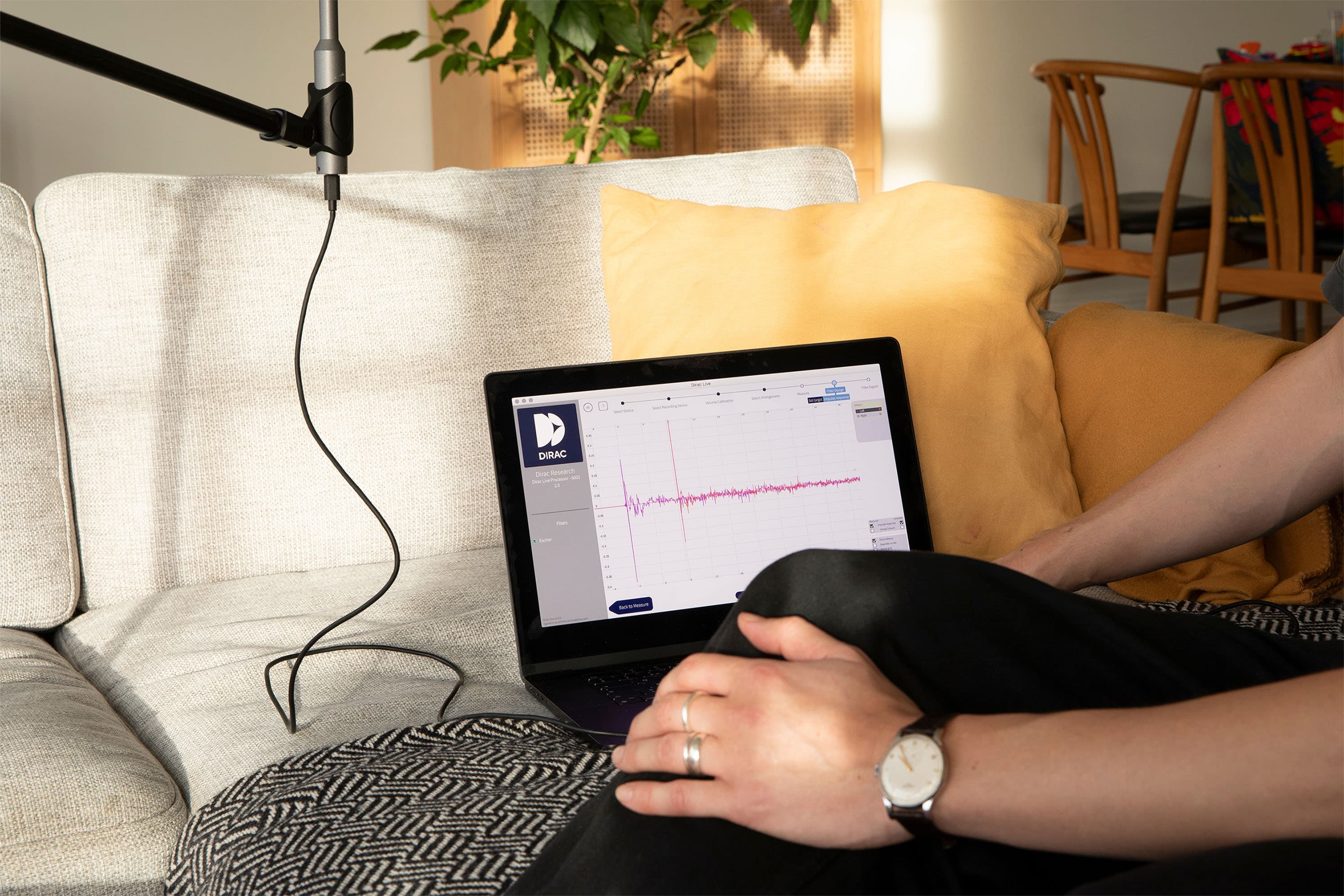
Room correction software measures how your system actually sounds in the room and compares it to the chosen target curve. It then adjusts the system to move the result closer to that reference. In other words, the curve acts as a guide for what the final tonal balance should feel like to the listener.
The curve you choose affects clarity, impact, and overall tonal balance. But the best choice is shaped by the acoustics of your room and your personal taste. The same curve can lead to different outcomes in different real spaces. The Harman curve is a well-known example, but it is only one approach, and it is not automatically the right one for every room.
From Measurement to Calibration
While calibration software can instantly detect sound issues, like resonance that makes bass sound undefined or "muddy," or dips in volume that make vocals sound thin, it cannot apply a correction based on measurement data alone. Measurements are not enough to define how the audio should sound.
This is where the target curve serves as the bridge. The software compares the measured, irregular response against your target curve and generates digital filters to align the two. Because the software builds these filters specifically to match this curve, the target curve effectively dictates the final "voice" of your system, controlling warmth, accuracy, and impact.
The structure of a Target Curve
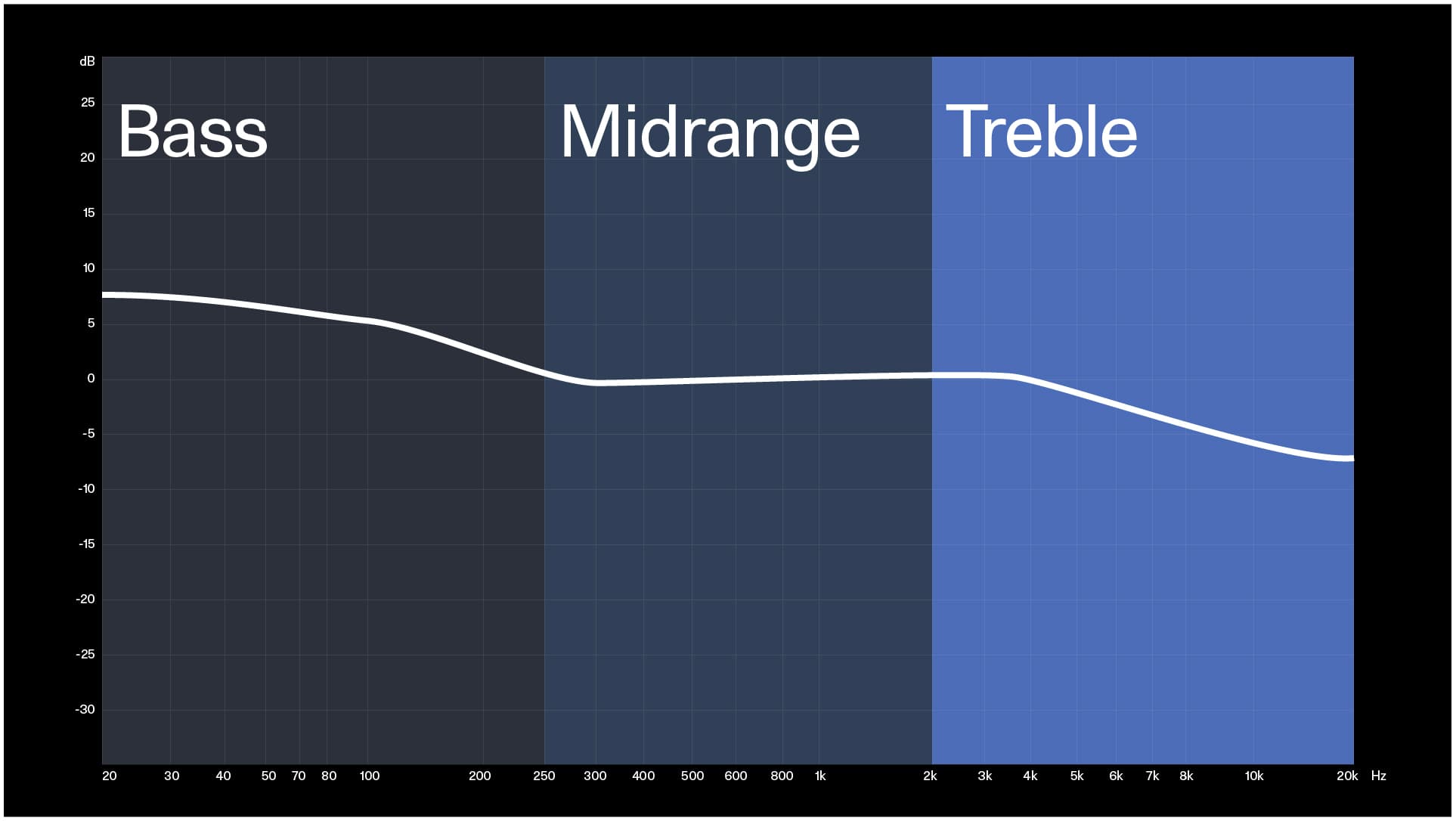
In reality, a target curve is rarely a straight line. To understand how to design or choose one, it helps to view the frequency spectrum in three distinct sections.
Bass
The foundation of any target curve is the Bass, where the curve typically exhibits a "rise" or boost. This elevation is critical because it provides weight and physical impact to the audio. In most preferred listener curves, this area is boosted by approximately +4dB to +8dB relative to the midrange. Without this lift, music and movies can lack punch and energy.
Midrange
The Midrange serves as the transition zone where the high energy of the bass blends into the vocal range. This area requires careful handling; if the bass boost reaches too far into the midrange, the sound becomes muddy. If the transition is too abrupt, the sound loses cohesion.
Treble
Finally, the Treble or High Frequency region governs clarity and detail. While crisp highs are desirable, a curve that remains perfectly flat up to 20kHz often sounds unnaturally sharp in a typical living room. Consequently, most target curves feature a gentle roll-off, typically dropping between -2dB and -6dB by the time it reaches 20kHz. This prevents the sound from inducing listener fatigue over long sessions.
The myth about Flat Response
In theory, a perfectly flat line, where every frequency is reproduced at the exact same volume, seems like the ideal objective. However, the human ear and the physics of real-world rooms often prefer a different approach.
A strictly flat in-room response is usually perceived as overly bright, clinical, and lacking in bass. This is partly due to psychoacoustics: our ears are less sensitive to bass at lower volumes, meaning a mathematically "flat" bass response sounds quiet to us. Partly, rooms naturally boost the bass frequencies, so a completely flat bass response will sound as lacking bass in a normal room.
Furthermore, in a natural room, high frequencies are absorbed by furniture and air more than low frequencies. A speaker that measures flat in an anechoic chamber will naturally show a downward slope when placed in a room. Forcing it to be flat at the listening position effectively boosts the treble unnaturally.
Therefore, the most universally preferred curves feature a gentle downward slope: higher bass levels for warmth, tapering down to softer high frequencies to avoid fatigue.
Popular Target Curves
While customization is possible, decades of audio research have established several reference standards, often called "house curves". Understanding these profiles will help you choose the right starting point for your system. Here, you can visualize some of the core differences in sound characteristics among these.
The Harman Target Curve
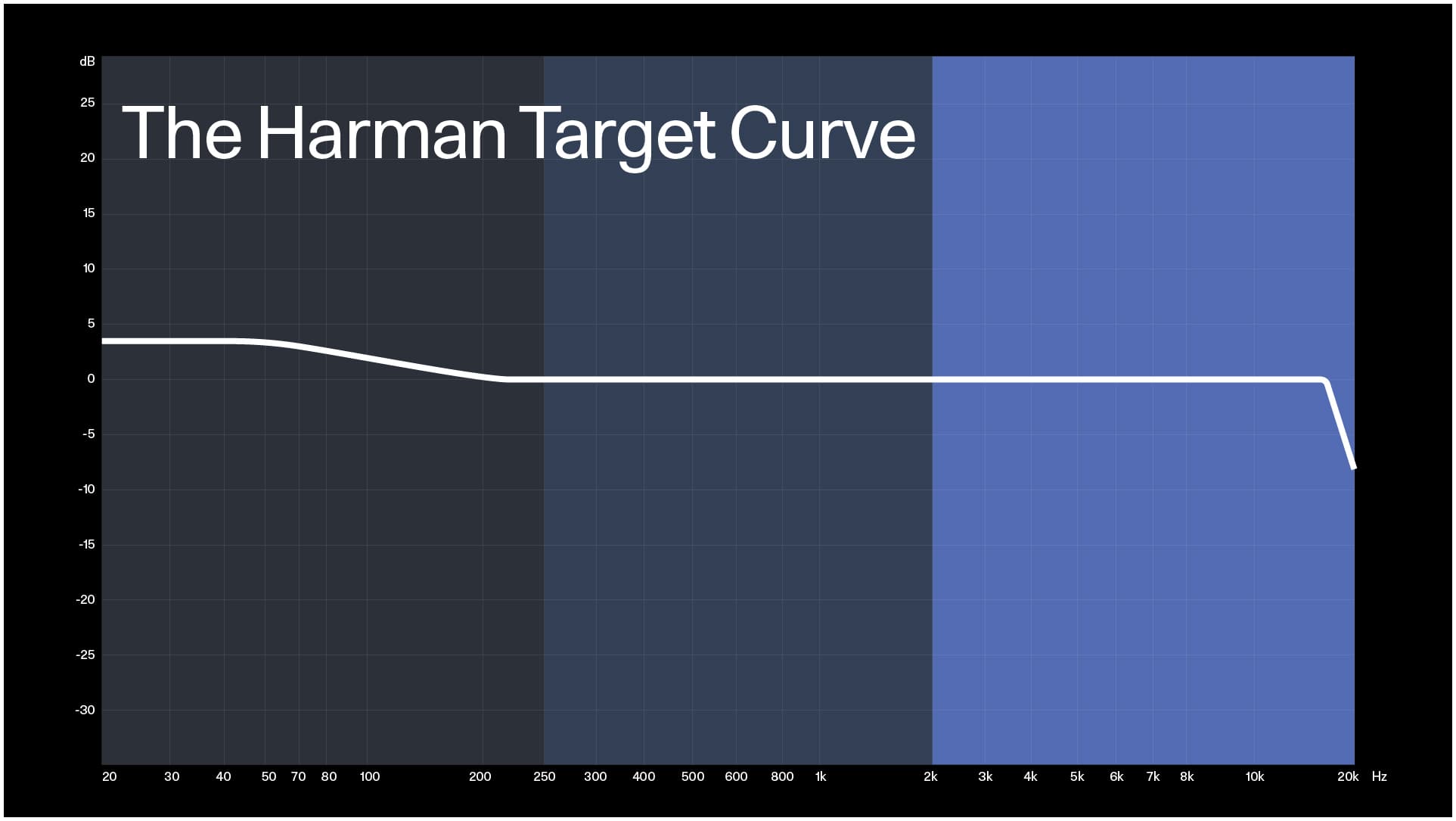
This is probably the most cited target curve in the consumer audio world. The Harman curve was created in 2012 from a rigorous scientific study that was documented in the paper titled The Relationships Between Perception and Measurement of Headphone Sound Quality.
Harman's team conducted double-blind tests with many listeners to identify the frequency balance most often preferred in small listening rooms. Harman designed this curve for in-room playback, but there is also a distinct version for headphones.
Core traits:
- Punchy & Dynamic: Features a significant bass boost (from +4dB to +8dB) that provides weight and impact.
- Modern Balance: Tapers to a flat midrange and a gentle treble roll-off to avoid harshness.
- Genre Suitability: Ideally suited for movies and modern music.
Why it matters:
Harman's study is scientific in method, but many forget that the results assume a controlled room, calibrated speakers, a seated listener, and moderate playback level. Still, it is a strong reference because it connects psychoacoustic data with controlled testing.
Download the Harman target curves here in +4db version, +6db version, +8db versions.
The NAD Target Curve
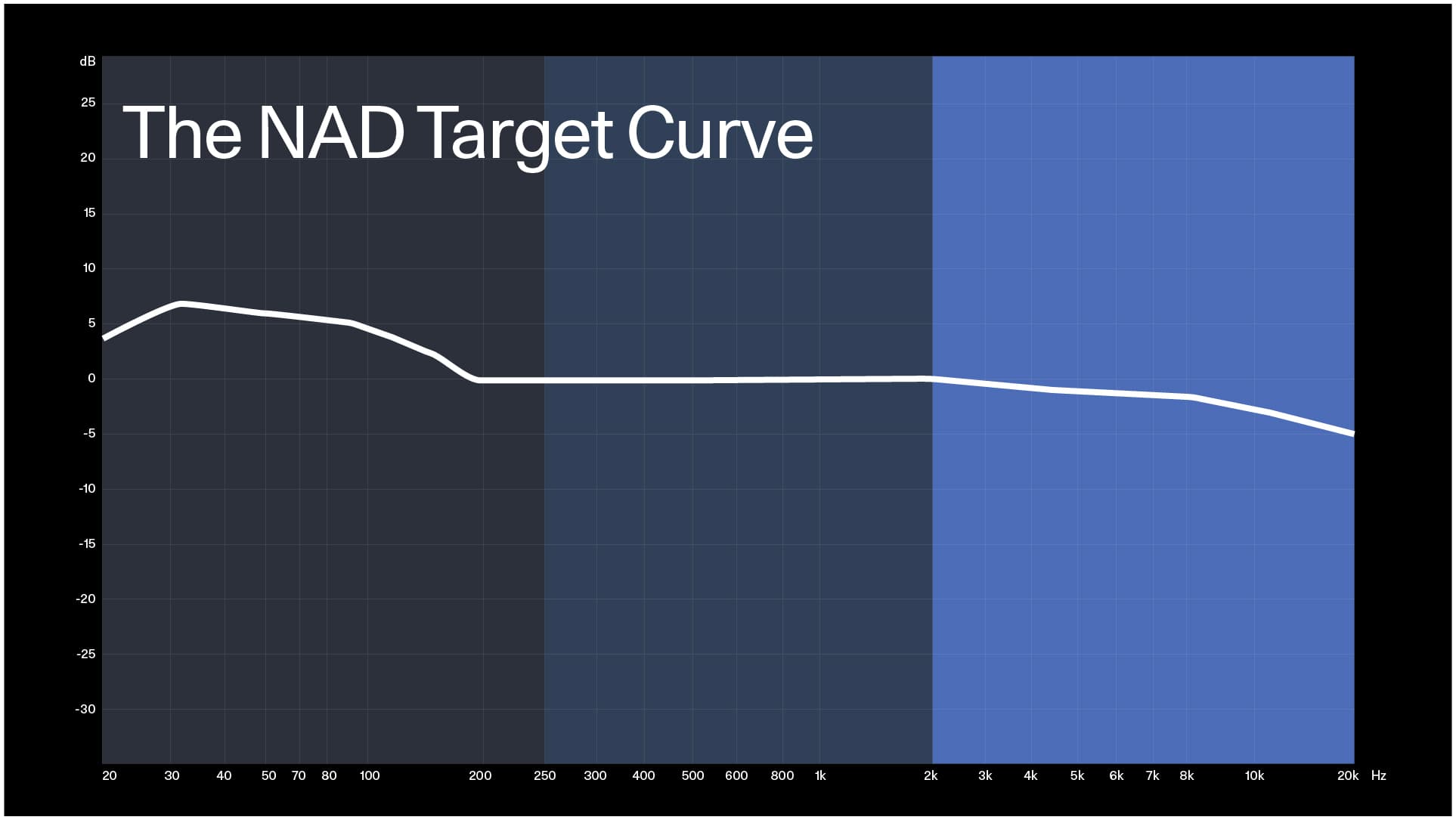
NAD has long advocated for a "house sound" that replicates the warm, energetic feel of a live performance. Unlike other curves on this list, NAD prioritizes musical "thump" over earth-shaking rumble. The curve peaks around 30Hz to maximize the impact of kick drums and bass guitars but rolls off the deepest sub-bass frequencies to keep the sound tight.
Core traits:
- Warm & Enveloping: Features a gentle, progressive rise in the lower frequencies that feels rich rather than aggressive.
- Gentle Highs: The treble roll-off is often slightly steeper than the standard Harman curve, ensuring that brightly mixed tracks remain listenable at high volumes.
Why it matters:
While some home cinema curves try to shake the foundation of your house, NAD's focuses on the frequencies where musical instruments actually live. It is designed to make stereo listening feel rich and "live" rather than clinical or overpowering.
Download the NAD Target Curve here or find it on the NAD Dirac Live Page (Note: Often included in the NAD microphone calibration download pack)
Audio Advice Target Curve
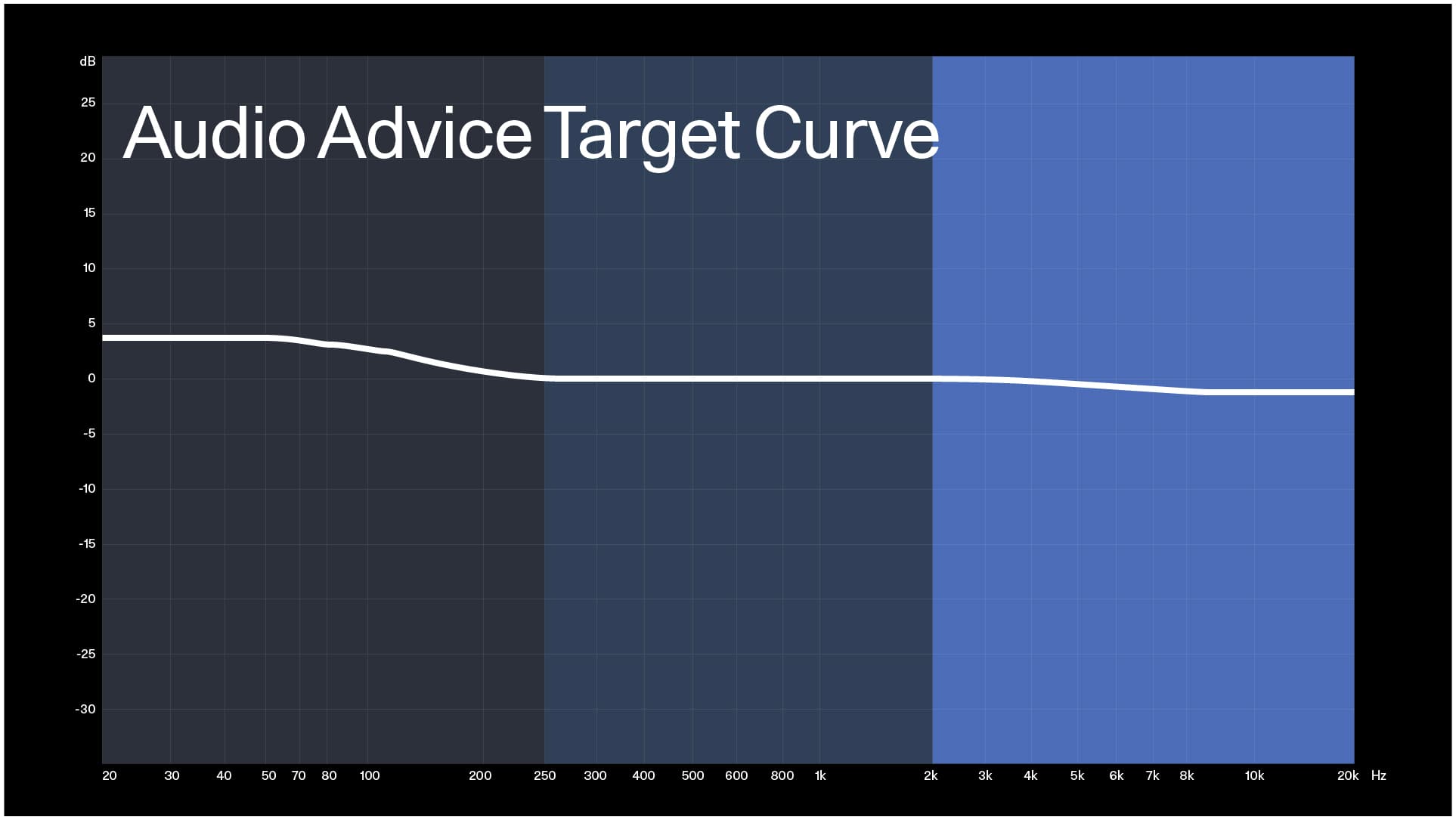
Developed by the home cinema integrators at Audio Advice, this curve is a popular custom variation of the Harman target. After calibrating thousands of home cinemas, they tweaked the standard Harman parameters to create a profile that aims to offer the "best of both worlds" for mixed-use media rooms.
Core traits:
- Engaging Low-End: Features a +3/+4/+5dB bass boost, offering good rumble for movies without drowning out details.
- Universal Appeal: Designed to sound exciting immediately, it serves as a crowd-pleaser for those who find flat curves too boring but Harman curves occasionally too heavy.
Why it matters:
This curve represents "real-world" optimization. While lab researchers aim for statistical averages, integrators aim for customer satisfaction in typical living rooms. It is an excellent starting point for users who want a home cinema that sounds impressive right out of the gate without needing hours of manual tweaking.
Download target curve: Audio Advice Dirac Target Curves
StormAudio Cinema Curve
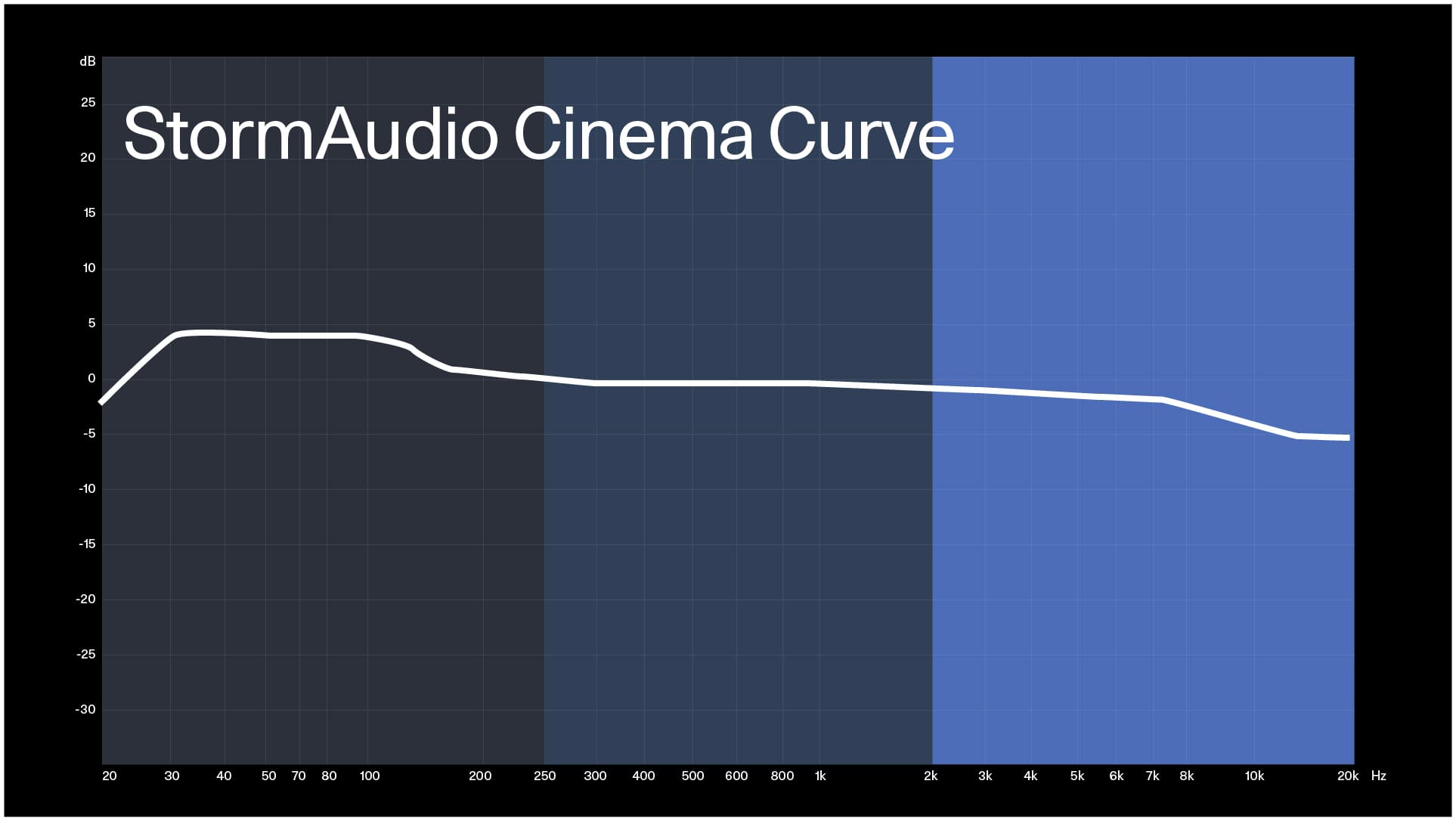
StormAudio processors are found in high-end, dedicated home cinemas, and their target curves reflect that. These are a true "Cinema" profiles and are even split by speaker type (Left-Centre-Right / Subs / Surrounds) for ultimate accuracy in reproduction. They're designed to be played loud without fatiguing your ears.
Core traits:
- Reference Warmth: The high frequencies roll off much earlier and steeper than the other curves, which prevents loud action scenes from sounding screechy or painful.
- Cinema Bass: Maintains a strong bass presence, but it balances it against a much calmer midrange to mimic the sound of a commercial cinema.
- High-Volume Optimization: This curve might sound "dull" at low volumes, but it comes alive when you crank the volume knob up to cinema levels.
Why it matters:
Films are mixed for large cinemas where high frequencies travel through air and screens, naturally softening before they hit the audience. When you play that same mix in a small room, it can sound harsh. StormAudio curves fix that problem, giving you the visceral slam of a cinema without the fatigue.
Download the StormAudio Cinema Curve here
The Flat Curve
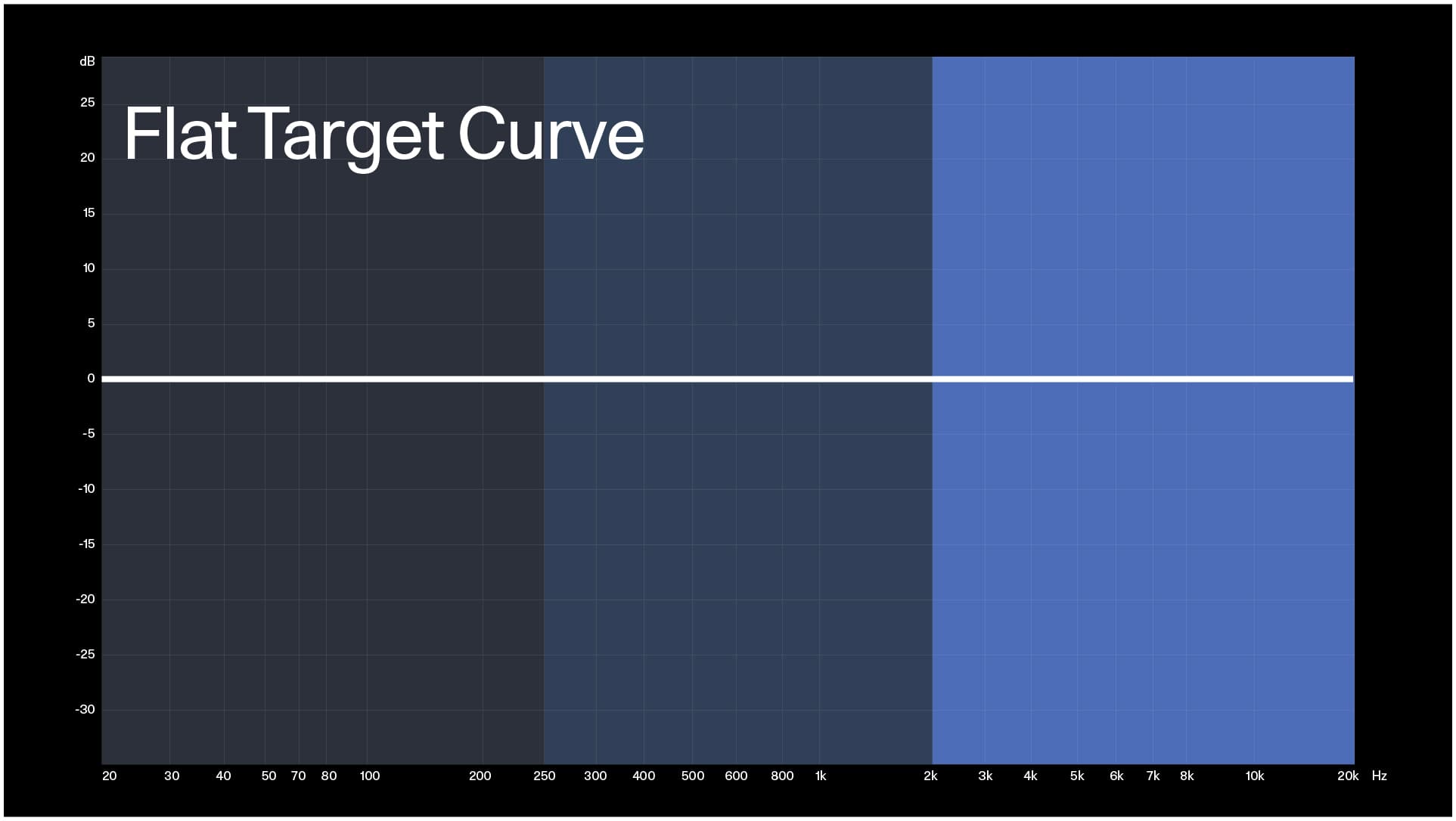
This curve is designed to mirror an unweighted anechoic "flat" response, meaning there is no intentional bass lift or treble shaping applied to the signal. In a digital room correction context, this forces the speaker to output equal energy at all frequencies at the listening position.
Core traits:
- Analytical & Revealing: Provides maximum transparency, exposing the source material exactly as it is without coloration.
- Technically Linear: Represents a theoretical ideal where input equals output across the spectrum.
- Perceptually Light: Without the psychoacoustic bass boost, it often sounds "thin" or lacking in weight to the human ear.
Why it matters:
While a perfectly flat line might seem ideal in theory, real-world rooms and human hearing often prefer something else. A flat response is a powerful tool for critical analysis and mixing because it reveals flaws, but it can be overly bright and fatiguing for casual listening. It serves as a baseline reference rather than a final listening goal for most users.
Download a flat room correction target curve here.
Downloading and Using Target Curves
Many digital room correction tools allow you to load custom target curves. Above, we provide target curves in a format compatible with Dirac Live. To use the target curves, download the ones that interest you, then proceed to the Filter Design stage in the Dirac Live app.
Use your downloaded target curve by clicking Menu > Load target curve > Then choose the speaker group on which you’d like to apply the curve.